
Shaders undoubtedly raise the quality of a game to another level. HyperLap2D can handle different types of Shaders to suit all situations.
- Individual entity shaders: Applied only to the texture associated with the entity during the rendering phase.
- Global Shaders: Applied to the entire screen.
- Screen Reading Shaders: Allow the entity to read the screen content as a texture to create advanced effects.
Shader Manager
Global shader management is handled via Resources -> Shader Manager.
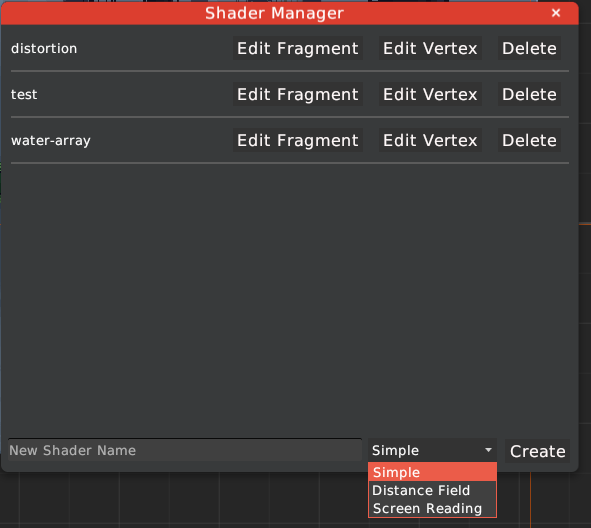
From this window, you can create new shaders using three available templates:
- Simple: A standard pass-through shader.
- Distance Field: Optimized for SDF (Signed Distance Field) effects.
- Screen Reading: Specifically designed for shaders that need to sample the background.
The Edit Fragment and Edit Vertex buttons allow you to modify the GLSL source code directly in your default text editor.
Applying Shaders to Entities
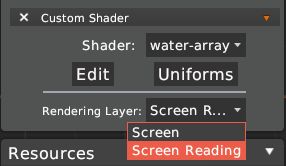
To apply a shader to a specific object, add a Shader Component from the “Add additional components” dropdown in the Properties panel.
Rendering Layers
In the shader properties, you can select the Rendering Layer:
- Screen: The shader renders the entity normally.
- Screen Reading: The runtime captures the frame buffer before rendering the entity, allowing the shader to use the background data for effects like refraction, glass, or water.
Uniforms
Uniforms are variables used to pass data from the editor or the game engine into your GLSL code.
Custom GUI Uniforms
By clicking the Uniforms button in the Shader Component, you can define custom variables that the shader will use.
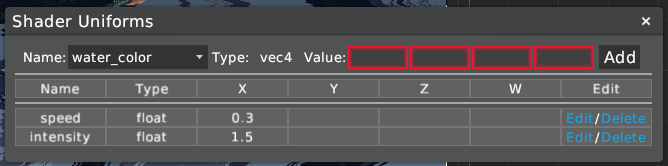
Supported types include int, float, vec2, vec3, and vec4.
Built-in Automatic Uniforms
The HyperLap2D Runtime automatically binds several standard uniforms. These can be used in your GLSL code along with any custom uniforms defined in the GUI:
| Uniform Name | Type | Description |
|---|---|---|
u_time |
float |
Total elapsed time. |
u_delta_time |
float |
Time elapsed since the last frame. |
u_viewportInverse |
vec2 |
Inverse of the screen resolution (1/w, 1/h). |
u_atlas_coords |
vec4 |
The UV coordinates (u, v, u2, v2) of the asset within its texture atlas. |
u_screen_coords |
vec4 |
(Screen Reading Only) The projected screen-space coordinates of the entity. |